Leave Excel Behind in 4–6 Weeks: Cloud MRP for Industrial SMEs

2026-09-08
A cloud MRP is the fastest way for an industrial SME to stop planning with Excel spreadsheets and reduce stockouts and downtime caused by material shortages. It calculates what to buy and what to manufacture by cross-referencing demand, the bill of materials, and delivery lead times, and can be accessed from any computer or mobile phone without your own servers. For a production manager who currently improvises with scattered spreadsheets, it is the operational improvement with the fastest return.
In summary:
Implementing a cloud MRP significantly reduces costs, shifting from hardware investment to monthly subscription expenses.
Remote access, real-time collaboration, and integration with systems such as ERP and WMS improve efficiency and planning accuracy.
Successful implementation requires cleaning data, defining a pilot, and measuring results at 30, 60, and 90 days, ensuring adoption and reducing manual tasks.
Compatibility with artificial intelligence and IIoT technologies supports more predictive and proactive production and maintenance management.
Choosing platforms with open APIs and privacy and SLA guarantees is key to avoiding disruptive problems in industrial management.
Table of Contents
-
Integration with ERP, MES, and the warehouse: what data needs to be shared
-
How to implement a cloud MRP: steps and a realistic timeline
-
What an integrated platform offers compared with setting up each component separately
-
What to review regarding legal requirements and data privacy
-
Bold Factory: the practical way to leave Excel behind in weeks, not years
What is MRP, and how did it move to the cloud?
MRP (material requirements planning) is the system that translates what needs to be sold or manufactured into what needs to be purchased and produced, and when. SAP defines it as software that calculates the procurement plans needed to meet forecast demand and production plans. It originated in the 1960s as a batch calculation on mainframes, almost always associated with large factories that had dedicated IT departments.
Classic MRP works with three inputs: demand (confirmed orders or forecasts), the bill of materials or BOM (the components in each product), and supplier lead times. Using these three data points, it calculates how much material is missing and when each order needs to be placed.
The evolution to MRP II expanded its scope to include plant capacity, labor, and costs—not just materials. This gave rise to the first bridges toward what we now call ERP: a system that no longer just plans purchases, but connects finance, sales, and production in one environment.
What has changed with the cloud is not the calculation itself, but who can afford it. In the past, setting up an MRP required your own servers, expensive licenses, and IT teams. Today, a web-based MRP platform runs on a subscription, updates automatically, and is paid for based on usage, which has democratized access for workshops with twenty or thirty employees that would never have considered it before.
The components any operational cloud MRP still needs are the same as always:
-
Demand forecasts or a portfolio of confirmed orders.
-
An up-to-date bill of materials (BOM) for each product.
-
Real-time inventory levels.
-
Actual delivery lead times for each supplier.
Tangible benefits of a cloud MRP for an industrial SME
The benefit that carries the most weight in the purchasing decision is the cost model. A traditional MRP required purchasing servers, per-user licenses, and annual maintenance; a cloud MRP is paid for as a monthly subscription, with no upfront investment in hardware. This turns a capital expense into an operating expense, something any SME's finance director appreciates when approving the project.
Cloud computing also provides scalability, remote access, a lower total cost of ownership, and analytics capabilities that a locally installed system rarely offers with the same agility. This combination explains why SMEs adopt these platforms faster than traditional systems: a pilot can be set up in days, not months, and the initial risk is minimal.
Professional tip: Before comparing prices between providers, calculate how much each stockout currently costs you in hours of production downtime. That number—not the monthly fee—is what justifies the change to management.
Other practical benefits that plant teams notice first:
-
Genuine remote access: the operations director can check the production plan from a mobile phone without being at the factory.
-
Collaboration between purchasing, the plant, and management using the same data, without different versions of the same spreadsheet.
-
Backups and encryption managed by the provider, without relying on an unmaintained local server.
-
Analytics that are beginning to incorporate AI-assisted forecasting instead of static formulas.
How a cloud MRP works in practice
A cloud MRP works through an input, process, and output logic that is worth understanding before implementing it, because it determines what data needs to be ready.
-
Inputs. The system needs demand (confirmed orders or sales forecasts), the bill of materials for each product, the inventory available in the warehouse, and the delivery lead times agreed with each supplier.
-
Requirements explosion. The MRP engine breaks each finished product down into its components, subtracts what is already in stock, and determines what needs to be purchased or manufactured.
-
Lot and date calculation. It groups requirements into reasonably sized orders and schedules them according to each supplier's delivery lead time or the internal production time.
-
Purchasing synchronization. It automatically generates purchase proposals that the purchasing manager only needs to validate or adjust.
-
Outputs and alerts. The system issues purchase orders, manufacturing orders, and alerts when it detects a risk of a stockout before it happens.
A simple example: a machine shop receives an order for 500 parts due in six weeks. The MRP checks the BOM, sees that 300 kilograms of an alloy with a four-week supplier lead time are missing, and automatically generates the purchase order with a deadline. Without this automatic calculation, someone would have to check the product record, stock, and supplier lead time manually, with the risk of catching the issue too late.
Integration with ERP, MES, and the warehouse: what data needs to be shared
A cloud MRP does not operate in isolation. Its real value emerges when it shares data with the factory's other systems without duplicating information or creating discrepancies between what the paperwork says and what is happening on the shop floor.
With the ERP, it mainly shares financial and commercial data: material costs, margins, invoicing, and the status of customer orders that trigger planning. The MRP calculates what to buy and manufacture; the ERP manages the business around that production. They are distinct functions that need to communicate, not one program with two names.
With the MES (manufacturing execution system), the exchange is more operational: the MRP says what needs to be produced and when, and the MES reports what actually happened on the machine, including timings and scrap. Without that feedback, the plan becomes disconnected from the reality of the plant within a few weeks.
Integrating a WMS or warehouse management system also provides batch traceability and the exact location of stock, which is critical in sectors such as food, metal, and pharmaceuticals, where every component must be traceable back to its origin.
-
The MRP needs to know actual inventory, not theoretical inventory, to calculate requirements accurately.
-
The MES provides actual production times, which help adjust the MRP's future lead times.
-
The WMS prevents a purchase order from being placed for something that is already physically in the warehouse but simply in the wrong location.
Professional tip: Before signing with any provider, ask to see its API documentation. If it does not have an open API to your current ERP, you will end up re-entering data manually—which is precisely the problem you wanted to solve.
How to implement a cloud MRP: steps and a realistic timeline
Most failed implementations do not fail because of the software, but because of the data and changing habits. These are the steps that make the difference between an implementation that takes weeks and one that drags on for months.
-
Clean the master data first. Review and update the bills of materials (BOMs) for your best-selling products first; do not try to digitize all 400 items at once.
-
Define a limited pilot. Choose a product family or a production line, not the entire factory. A 4-to-6-week pilot with measurable results is more persuasive than a full rollout that has not been validated.
-
Set success criteria before you begin. For example: cut stockouts on that line by half, or eliminate the parallel Excel spreadsheet used by purchasing.
-
Train operators and purchasing staff in parallel. Resistance to change often comes from someone who fears losing control of “their” spreadsheet, not from someone using the system on the shop floor.
-
Assign a governance lead. Someone needs to decide who updates the BOM and who validates supplier lead times, or the system will become outdated within weeks.
-
Measure at 30, 60, and 90 days. In the first month, track actual daily use; at subsequent stages, measure the reduction in stockouts and the time saved on manual planning tasks.
Professional tip: The most honest indicator of a successful implementation is not how many people use the system, but how many people have stopped opening the parallel Excel spreadsheet. If that file is still being used after 60 days, some part of the process has not been properly closed out.
The typical implementation timeline depends on the scope: a limited pilot on a platform designed for SMEs can be up and running quickly, while full integrations with ERP and multiple modules usually take weeks or a few months—a considerably shorter time than very extensive custom projects.
What an integrated platform offers compared with setting up each component separately
Many SMEs discover too late that an isolated MRP, without a connection to production and the warehouse, ends up creating the same problem it was supposed to solve: duplicated data and decisions made using outdated information. Market analyses point to a growing preference for solutions that bring MES, MRP, and WMS together precisely to avoid these silos.

Some platforms combine planning and purchasing (MRP), production control (MES), warehouse management and traceability (WMS), and machinery maintenance (CMMS) in a single solution, with API integration to the company's ERP. This coverage avoids the usual scenario of having three or four programs that do not communicate with each other.
Points that often weigh on a production manager's decision:
-
Implementation measured in days, not the months or years typical of custom development.
-
No long-term contract, reducing the risk of being locked into a system that does not meet expectations.
-
An interface designed so any operator can use it from a mobile phone, without a long learning curve.
-
AI agents that automate repetitive tasks through natural-language instructions, without the need to program complex rules.
What to review regarding legal requirements and data privacy
Moving production planning to the cloud means that sensitive data (costs, suppliers, sales volumes) passes through a third party's servers. That is not a problem in itself, but there are a few things to check before signing.
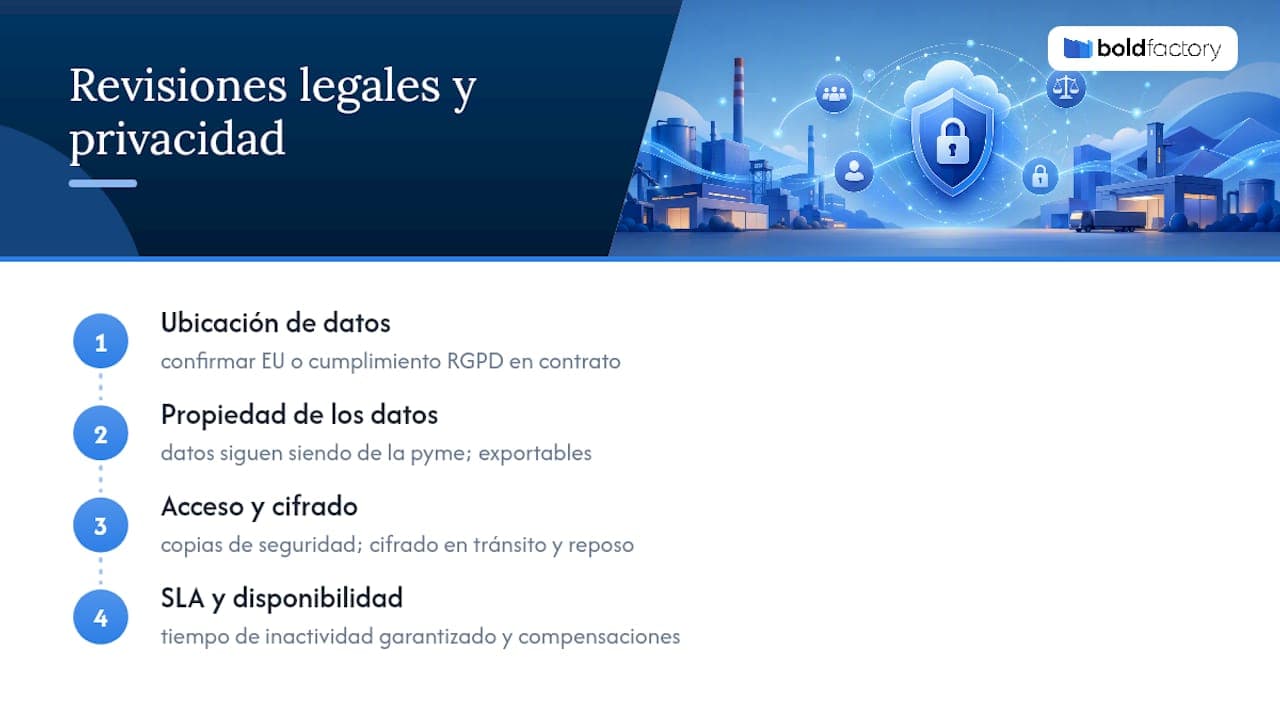
First, verify where the data is physically stored. If the provider operates in the European Union or certifies compliance with the General Data Protection Regulation (GDPR), the company retains the same legal protections as with any other provider processing sensitive personal or commercial data. Ask for this information explicitly in the contract rather than assuming it.
Second, check data ownership. A well-written subscription agreement makes it clear that the SME retains ownership of its production, customer, and supplier data—not the software provider—and that the data can be exported if the company decides to change platforms.
Third, check access and encryption. Ask how the provider manages backups, whether it encrypts data in transit and at rest, and what happens to the information if the company cancels its subscription. These are legitimate questions that any serious provider should answer directly.
Finally, it is worth reviewing the service-level agreements (SLAs): how much downtime the provider guarantees, and what compensation is available if the system fails at a critical point in production. This is no minor detail when the planning for the entire factory depends on the system being available.
Where cloud MRP is headed: AI, IIoT, and what to watch for
Artificial intelligence is no longer a distant promise in production planning. Industry analyses describe how AI is redefining smart manufacturing by improving demand forecasting and anticipating maintenance before a breakdown occurs. Combined with data from plant sensors (what is known as IIoT), AI can adjust production plans using actual machine data, not just historical estimates.
For an SME choosing technology today, the practical recommendation is simple: prioritize platforms that already include these capabilities natively, rather than promising them “soon.” A system that learns from your actual plant data is worth more than one that only automates paperwork.
Bold Factory: the practical way to leave Excel behind in weeks, not years
Instead of custom development that takes months to get started and locks you into long contracts, there are alternatives that can be implemented in days, with no long-term commitment and integrated modules from day one.
That means you do not have to choose between digitizing production and digitizing the warehouse: the MRP planning module automatically shares data with production control and machinery maintenance, so a manufacturing order delayed by a breakdown is reflected in the plan without anyone having to update three different systems by hand. API access to the existing ERP also avoids the duplicated work of entering the same data twice.
If your team is still planning with spreadsheets that become outdated every week, the logical next step is to request a demo of Bold Factory's software for industrial SMEs and see, using your own data, how much manual planning time can be eliminated in the first month.
Sources
To explore each claim in this article further, it is worth reviewing SAP's technical definition of MRP directly, as well as the industry case study on cloud MRP for metal service centers.